CONTACT

Monday, November 21, 2011

Love that snow! And, a tiny Digital Baby Step


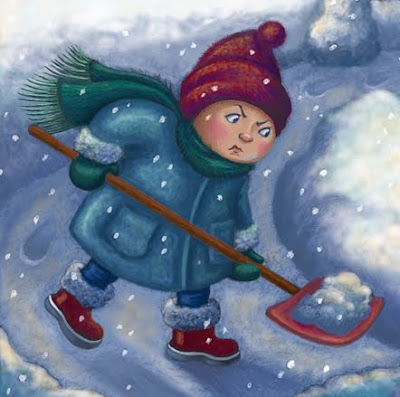
So, here's the color version of my happy little shoveller. The snow we had when I posted the sketch is long gone, but I'm sure there will be more to keep this little guy happy.


And here's the whole piece. The big snowy spaces provide room for type. The text, of course is top secret! It's wonderful though. Worth a wait! Working around type sometimes makes for compositions that are a bit odd looking, but snow, sky, light colored walls, etc. can help. Part of the challenge!

Today's Digital Baby Step is small indeed, but if you don't know it, maybe you'll like it as much as I do. You may know that when working in Photoshop, if you press the F key, you can change the look of your desktop. It's what you see around/behind the image while working on it. If you haven't tried this before, go for it! Just remember, if you don't like the different backgrounds (grays and black) the F key will bring you right back where you started. I've known about the F key for quite awhile,  but I just learned something new.


When you have the black background, if you then press the tab key, you'll see your image and only your image on a black screen. It eliminates the tools and palettes from the screen. I like doing this at the end of the day, or when I'm going to be away from the computer for awhile. It's a good way to have a fresh clear look at your work when you come back. Here's an example of the work on the black "clean screen" when this work was in progress. Nice and clean and focused on the work and the work alone. When you want to get your tools and palettes back, just press tab again and you are good to go.

Wednesday, November 2, 2011

Sneak peak and October surprise!


This is a sneak peak at a small portion of a bigger project that I've been working on. It seemed appropriate for me to post this unhappy little shoveller now. We had a surprise snowstorm in my area. Actually, the whole northeast of the US had it. Around here, snow in October is pretty much unheard of. Or, at least, it was. Halloween has been postponed in our town. BOO! Lots of tree damage and lots of power out. The trouble was that all the trees still have their leaves, so the weight of the snow brought a lot of trees and big limbs down. Boo!

So,this little guy wasn't created because of this storm. If he had been, maybe there would be the hint of a Halloween costume peaking out from under his coat and lots of trees down in his yard. Boo!

But, in our town, he can go trick or treating this coming Friday! Yay! And, BOO!

Thursday, June 2, 2011

Illustration Friday - Asleep


A little study for the prompt: Asleep. I have a color version in the works, but it won't be ready by midnight because........ I'd rather be asleep.

Sunday, May 22, 2011

Toy Road Trip Final Version/Another Diigital Baby Step


Last time, I posted this image a little prematurely in order to be able to participate in Illustration Friday's prompt, Journey. You can see the earlier version here. And here (above) is the new, final version with some improvements, I hope! I worked on the grass, added some texture to the road, and tweaked some other things: some touch ups to the trim on the truck and a bit more rendering on some animals. (That giraffe was looking pretty flat!) So, I hope it looks better now.

As usual lately, there were more Digital Baby Steps in this piece. I've been so lucky to learn how to work digitally from such master teaching artists as Will Terry and Rob Colvin. In addition, I do One-to-One sessions at my local Apple Store. There's no end to what I need to learn! My trainer there is Justin, who is also an artist and graphic designer. (Lucky me!) Visit his website: avoidperil.com  and you will see. Justin is a wonderful instructor who has contributed greatly to my Digital Baby Steps.

Here's another little step that I've found to be extremely helpful: saving swatches. You can see your swatches by going to Window > Swatches. Here's my current collection:


While you are painting in Photoshop, you might select a color from the color picker (you'll see this below) that you want to save. Once you've selected your color it will appear in your tool bar. I've shown just a part of the tool bar below. To save your new color to your swatches palette, double click on the color. You'll be double clicking on the foreground color. (Looks like a little black box here.)


 After you've double clicked on it, you'll get a window that looks like this. You may still have this window open from having chosen your new color  from the color picker, in the first place. Either way, this is where you can add your new color to your swatches palette.


In the upper right of this window, under OK and Cancel, you see the option to Add to Swatches. When you click on this, another little window will open that looks like this:


Here, you can name your new swatch, by typing where it says, Swatch 2. Name it whatever you like. When you click OK, it will be added to your swatches palette. Hover over the new swatch in the swatches palette with your mouse and you'll see the name that you've given to your brand new color.  

I love this little trick! If you didn't know it before, I hope you have fun!


Thursday, April 21, 2011

Illustration Friday - Journey


"The Toy Roadtrip." I may still tweak a few things on this one, but it's getting late for IF, so I think I'll post now and tweak later. This is all digital, btw. My third digital piece. 

Thursday, April 7, 2011

Illustration Friday - Duet


This is a possible character for a possible story about my character Pierrot. I created Pierrot awhile back and have a few storylines in mind for him. You can see Pierrot below. This new drawing (above) was also a chance to explore what the landscape and architecture might look like in Pierrot's story.


Pierrot is an acrobat, so when the prompt 'Acrobat' came along on Illustration Friday, it was time for Pierrot to make his debut. The piece below is Pierrot's first public performance.


Thursday, March 10, 2011

Illustration Friday - Warning - Digital Baby Steps


The sketch for this piece was called "The Report Was Not Good." But, I think it fit this prompt fairly well. The drawing is from the series that I call 'After Hours Drawing.' These are drawings that I do late at night, after I've left my work room. I go to the living room, put my feet up, watch/listen to TV and draw. The thing about these drawings is that I have no preconceived idea. I just start drawing and whatever happens happens. I had nothing specific in mind for this piece, but, obviously, the result was a character that looks sad and anxious. Only after the fact did I realize what might have been in the back of my mind. I was concerned about a friend. But, the way this type of drawing happens is that I start with a line. The line usually becomes a face, then one shape leads to another and, eventually, there it is. That's not to say I'm in some sort of trance. But, the closest I come to controlling the end result is when I think it needs a shape here or an object there, and try to come up with something that fits. But, I also try not to over think it. Just do it. These drawings seem to have their own internal logic. It's the most intuitive work that I do. And, I love doing it. You can see the original drawing here.

The finish was done digitally. Thanks to Will Terry's wonderful video series, I think I'm a convert!

I'm also doing 'one - to - one' sessions at my local Apple Store. I call it Apple School. I'm very lucky to have someone who will do photoshop with me. So, I'll share a few tips from Apple School whenever I post a new digital piece.

You know the expression 'tip of the iceberg?' Well, what I know about Photoshop isn't just the tip of the iceberg, it's like a tiny ice chip off the tip of that iceberg. But for me, every single little tip that I learn is helpful. So, small as they may be, I'll keep sharing these little tips.

This week, I thought I would mention folders, in layers. In the layer palette, there's a little icon down on the bottom. It's the third from the right.


When you click this icon, it creates a group. The group shows up in the layers palette. You can name the group by highlighting it, then going to Layers in the menu bar. Layer > Group Properties. A window appears with a space for you to type the name of the group. Then you can drag layers into the group. For example, in this piece, I created several groups of layers . One group was for the door. I did a separate layer for the door frame, the window in the door, and the door, itself. Then I dragged those layers into the folder for this group. Each layer was named the same way. Layer >Layer Properties, then type it's name. For example, door frame, window in door, etc.  Then each of these layers were dragged into the group. I find this very helpful! If you didn't know about this before, I hope you find it helpful too!

Wednesday, February 23, 2011

Illustration Friday - Layer - Digital giant leap. And, an After Hours Drawing


My first all digital painting! Thanks to Will Terry, my digital baby steps got a lot bigger in the past couple of weeks. More like one big giant leap! How nice that this week's Illustration Friday prompt was 'layer.' I learned how to use layers and a whole lot more from Will's series. I can't recommend it highly enough. Not only is it jam packed with information that even I could understand, it is a bargain as well. Will is such an amazingly generous guy! Check out the series here. I'm happy to share some of what I've learned, but don't want to give too much away. It's much better for you to see for yourself! Thanks Will! You are a spectacular illustrator, a great teacher and such a fine and generous person! I can never thank you enough!

In addition to Will's video series, I also had help from Rob Colvin, a wonderful landscape painter and fellow contributor to Illustration Friday. Rob, like Will, is a generous teaching artist. He was very kind and helpful in getting me started! I am so lucky to have connected with Rob. I'm in awe of his work and so grateful for his help too!

Scroll down if you'd like to see some of the steps that I followed to make this illustration.


There was no doubt what my first color would be!


Next, the sketch is opened in photoshop and dragged onto the textured underpainting. It automatically becomes a layer. In the layers palette, select 'multiply' to blend the background and sketch layer. 


Learning how to make a textured background to use in photoshop was one of my favorite things  from Will's video series. I created the texture, imported it into photoshop, then applied the color I wanted for my underpainting. It's all explained in the video series.


Here's the sketch that I started with. You can see, I decided to leave a couple of things out in the finish. The drawing began as one of my After Hours Drawing series. A swipe of my pencil on the paper became the shape of this guy's head. And the rest flowed from there. These drawings really feel as though they create themselves and I'm just along for the ride.

Thursday, January 27, 2011

Illustration Friday - Dusty/Digital Baby Steps


His name was R. Dustorm McCloud, but folks jes called im Dusty. He got that there name cuz he was born in the great Dust Storm of 88. 19 and 88 that wuz. The R. was cuz he wuz named fer his Pa, P. Rusty McCloud. Another yarn fer another day. But that's right, Dusty was Rusty Dustorm McCloud.

Somethin' 'bout bein' born in that there whopper of a storm. Dusty was born dancin up dust storms wherever he went. Even when he wuz a wee bitty thang! Good thang his Pa married his Ma! Cuz her name was Molly Clean-er-Up McCloud. And yeseree, that's another yarn fer another day too!
- - - - - - - - - - - - - - - - - - - - - - - - - - - - - - - - - - - - - - - - - - - -- - -
This is another digital experiment in Sketchbook Express. I took some screen shots along the way. You know there's nothing worse than a convert.... But rest assured, it's not my goal to convert the world. Rather, since I'm a digital novice (and I know some others) I thought I'd share some baby steps along my way. So if you'd like to see this drawing as it progressed, scroll on down to the bottom of this post to see how it was done in that there magical drawing machine thang - Sketchbook Express. (Ooops, there's still a little dust storm goin' on in my brain!)


For me, one of the unintended consequences of learning to do screen shots is that I discovered you can cut and paste from a screen shot. At one point, I felt like I was losing some of what I'd done previously. (Several points, actually. Including the finish! Sigh..) But, when I looked at an earlier screen shot in Preview, I was able to cut and paste from that earlier stage of the drawing and put it back into SE. Truth be told, I'm not at all sure I retained the energy of some of the earlier stages in this drawing, so I may do it again. Nice to know I can walk backwards through my screen shots.


Zooming is certainly one of the great advantages of anything done digitally. Can't do that on paper. Not that I don't expect to continue drawing on paper! But, it's nice to have the choice!


You can rotate parts of your drawing, move them, etc. Of course this is nothing new to anyone who draws digitally in Photoshop or Painter, but in SE, when you click the tool, it appears right in your drawing. Tools are accessible in a very streamlined way.


When I draw on paper (usually extra heavy tracing paper) I draw on both sides. I flip from front to back in order to check my proportions and see if anything looks out of whack. In SE, you can do this by going to Image > Mirror canvas. I do a lot of this - both on paper and in SE.


First rough idea. Sketchbook Express is in no way a substitute for Photoshop or Painter, but it has some nice features and it feels natural and easy to use.

Wednesday, January 19, 2011

Illustration Friday - Chicken (Rooster/Chooster?)


"You cluckin' to me?"

A chicken with a little attitude maybe? Could have more, we'll see. This was an experiment, so maybe I'll do more with this character. Push it further. It's a bit more realistic than I like, although it looks rather roosterish. Perhaps it's a chooster. But, in the meantime.....

It was mostly a digital experiment. I've always thought that even if I started working digitally, I'd still always draw on paper. But, recently, someone suggested that I try Sketchbook Express. It's an Apple App. (Hah! If nothing else, it's fun to say!) The Apple App store icon appeared on my dock recently, so it was easy to find. This version is free, so why not give it a whirl?

I like it. Specifically, I like the pencil tool. (So far.) It's simple and intuitive and felt pretty natural - with a Wacom, of course. It's no substitute for Photoshop or Painter, but I like how direct it is for drawing. Of course, there are the advantages of being able to select areas, rotate them, move them, etc., all of which I did in this drawing. So, maybe I'll like drawing this way after all. I'm not making a commitment yet, but so far, so good. Another tool in the toolbox.

Tuesday, December 7, 2010

Friday, December 3, 2010

Snowpeople


Snow! We haven't had any here this year - yet. But, it sure feels like it could happen any minute. Very cold here! Well, it is December. This is a section of a piece that I did years ago. I still like parts of it, but I'd like to do the whole of it over again. It's on the 'to do' list. Pretty long list this time of year. And for some reason, there's a big backlog right now. So much artwork I'd like to do! So many ideas, so little time. But that's a good thing, even though it doesn't feel like it sometimes. Sigh..... In the meantime, here's a little piece of my past. Happy winter!

NEW ART NEWS: NEWS!


I've just learned about an illustration site called Illustration Pages. IP is a wonderful resource that features the work of visual artists from around the world. I love seeing work that is new to me! There are interviews, articles and links to online stores, blogs, websites and Facebook Fan Pages. I learned about this site when they featured the the work of Juanita Martinez-Neal, a wonderful, imaginative, illustrator whose work you will not want to miss. You can follow Juanita on Facebook here. Visit her website here. And, you can follow Illustration Pages on Facebook here.

Thursday, November 4, 2010

Illustration Friday - Spent


How I Spent My Time Last Week: Last week, the prompt for Illustration Friday was 'racing.' But, I spent the week working on some other artwork and didn't finish this piece in time to post. So, I spent last evening finishing 'racing' just in time to post.

Thursday, October 21, 2010

Illustration Friday - Spooky


Something a little different for me! I didn't think I would be able to participate in IF this week. But, while I was in the waiting room for a doctor's appointment this morning I did the black and white drawing at the top of this post. I did it with a ball point pen on the back of a fairly small receipt that was in my purse. When I got home, I added a little color in Photoshop. I think I still like the black and white version best though. The inspiration for this drawing was my sweet little dog, Kappy. (So scary!) She won an award for her vampire costume at a fund raiser for a dog park last summer. That's my husband, Paul, who is also pretty sweet! I had this little vampire (Kappy) in mind when I did my spooky sketch at the doctor's office. As usual, I took some artistic license. Not my best work, that's for sure! But it was kind of fun and helped to pass the time. 

Thursday, October 14, 2010

Illustration Friday - Transportation


Ooohh! I'm dying to get some color back on this blog! Too bad it won't happen in time to post on Illustration Friday this week. In the meantime, here's my sketch for 'Transportation.' When I've finished this piece in color, I'll post it. I'm having a big debate with myself about the sky. Add some clouds? No clouds just some interesting color? I'll have to see how it evolves.

Saturday, October 9, 2010

One Lovely Surprise


I've been honored to receive this Lovely Blog Award from Michele, at The Mushroom Tender.  I love seeing what Michele comes up with each week for Illustration Friday. Her artwork is clever, fun and beautiful! Michele has a very fresh, lively style that I really admire. Every week brings a new visual surprise at The Mushroom Tender. And, because her posts are as clever as her artwork, Michele's blog is as much fun to read as it is to see. Thank you Michele!

I've promised to pass this award along. So, I've chosen some of the lovely blogs that I've "discovered" by participating in Illustration Friday. IF has been a great experience. Of course, there is the opportunity to see the work of other wonderful illustrators in the IF community. But, there is also the opportunity to leave and receive comments, to follow and be followed and to learn from all that is so generously shared. Thank you so much to everyone that has shared, everyone that has stopped by my blog to leave a comment, and everyone who has chosen to follow my blog! All is much appreciated!

Here is my list of lovely bloggers for you to enjoy:

My list, and this post, would not be complete if I didn't give a special thanks to K.H. Whitaker who was the first to welcome me to Illustration Friday and who has continued to stop by my blog (and many others) to leave kind comments and words of encouragement! You can see her lovely work at A Puddle of Crumbs. Thank you K.H. Whitaker!

Thursday, October 7, 2010

Illustration Friday - Beneath


Hope springs eternal. Hoover waits patiently in hopes that a tidbit will land beneath the table. I'm not sure if this is a work in progress or a pretty tight sketch. I may keep it black and white and work on it some more. Or, maybe do a version in color. I'm sure Hoover will wait patiently for whatever I decide.

Wednesday, September 29, 2010

Illustration Friday - Old Fashioned


Agnes is a little old fashioned. And maybe a tad eccentric. I love her. Before I started doing Illustration Friday, I was doing something that I called After Hours Drawing. She started with a curved line on the page, one line led to another and next thing I knew...... Agnes! This week I combined the two - After Hours and Illustration Friday.  If you look to the left of my blog under labels, then click on After Hours Drawing, you can see all of my After Hours Drawings - so far. I should also add Agnes to the Characters page of my website. It's woefully in need of more participants.

Thursday, September 23, 2010

Illustration Friday - Acrobat


This is Pierrot. I did a sketch of him awhile back. You can see my sketch below. He is an acrobat. Now he has a chance to perform for you.


Thursday, September 9, 2010

Illustration Friday - Dessert


I did this illustration awhile ago. It was a sample for a lift the flap book by a very successful writer that I met at a conference. She was great! Her work was great! She asked if I might be willing to do a couple of samples for an unpublished manuscript to show to her editor. I said sure! Normally, I wouldn't do work on spec, but this was great fun. Unfortunately (or perhaps fortunately) I was very, very busy at that time with multiple deadlines. I loved doing a couple of pieces for her. I wish I could have done more. The manuscript was terrific!
I do like my newer work a bit better, but this was one of those weeks that I couldn't do a new piece. So, here is my illo called "Burp!"